Portfolio Sample
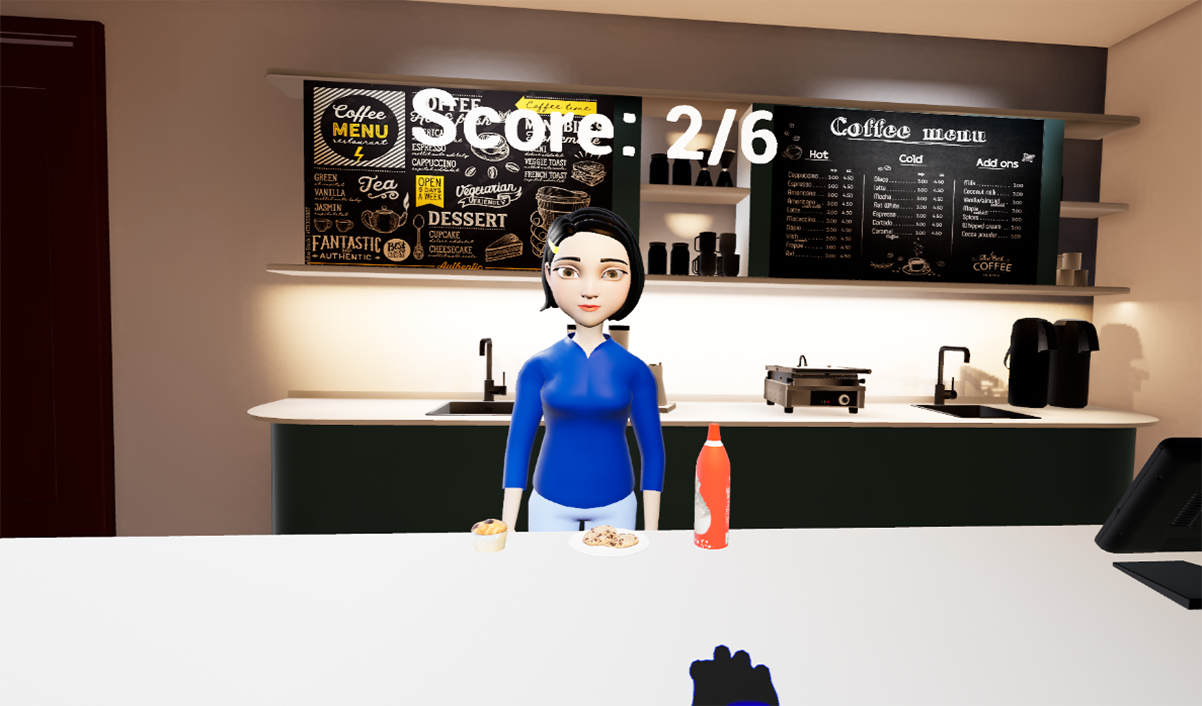
Above, the player’s view within the virtual reality app.
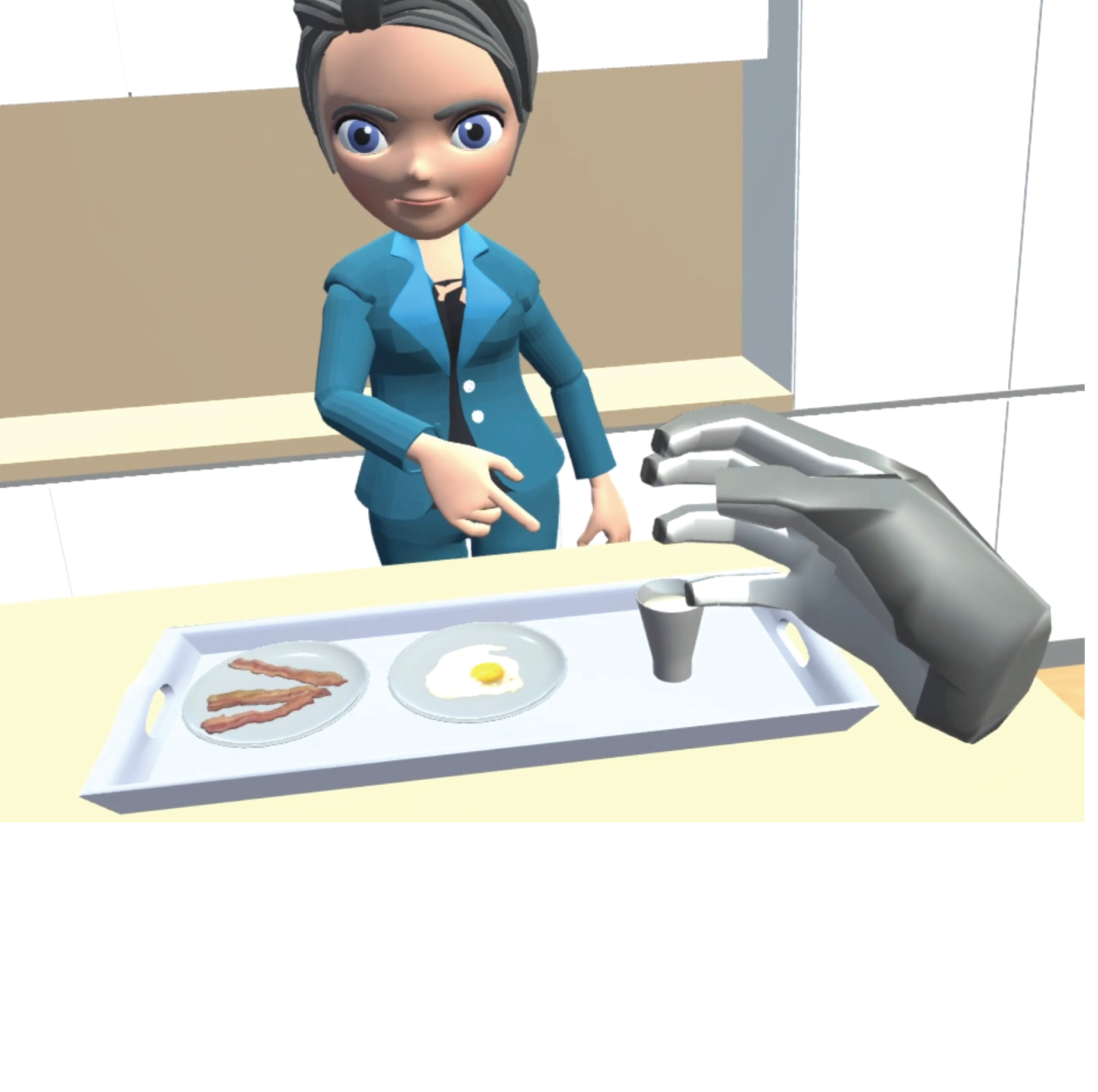
Above, an early version of the app demonstrating signing avatar and hand tracking capabilities. 2019.
In-development sign recognition and feedback from the teacher avatar. ~2023
ASL Champ!
Designing an interactive environment for learning sign language
ASL Champ! is a virtual reality application in which beginners learn American Sign Language from a signing avatar, practice signs, and receive immediate feedback on their attempts. I originated the concept, secured federal funding, and led the research team that developed it from an early prototype into an interactive learning game.
The project brings together my research on perception and embodied learning with a practical design question: How can technology help people learn movements that they need to see, understand, and produce themselves?
My role: Concept development, proposal writing, research leadership, user research, and instructional and interaction-design decisions.
Team: A multidisciplinary, majority-Deaf team contributed expertise in ASL, motion capture, animation, software development, and machine learning.
Starting with the learning problem
Learning ASL involves perceiving movements in three-dimensional space and mapping another person’s actions onto one’s own body movements. A learner must attend to handshape, orientation, location, and movement, often while mentally transforming the instructor’s perspective into their own.
I conceived Signing Avatars & Immersive Learning—SAIL—with my collaborator Melissa Malzkuhn, to explore how an immersive environment could support this embodied process. Learners would encounter a signing teacher in three-dimensional space and see representations of their own hands as they practiced. Motion-captured signing would preserve the movement detail needed for authentic ASL.
The initial proposal received a three-year, $300,000 National Science Foundation EAGER award. Working with collaborators at Gallaudet University, we developed a functioning prototype and began testing the experience with novice learners.
Moving from demonstration to interaction
The first prototype (around 2019) could display signs and allow learners to practice, but it did not evaluate their attempts. The avatar continued its instructional sequence whether the learner signed correctly or incorrectly.
Early user testing made this limitation tangible. Participants wanted the teacher avatar to respond to their signing. They also wanted more time to see and reproduce the signs. In response to timing feedback and related research, we reduced the avatar’s signing speed to 65% of its original speed.
I then wrote the follow-up proposal to expand SAIL into a more functional game with sign recognition, corrective feedback, and progression through learning activities. Across the two awards, the project received ~$1.18 million in NSF support. My collaborator and I expanded the team to bring together the expertise needed to build and evaluate this more responsive system, which became an app named ASL Champ!.
Designing feedback beginners could understand
One interaction-design decision I made was that the avatar’s feedback should be gestural, understandable without prior ASL knowledge, and supportive in tone. An ASL sign for NO would not necessarily communicate anything to a beginner who doesn’t understand the sign. Written English could communicate the result, but I wanted the feedback to remain part of the visual interaction with the teacher.
I specified two responses: Successful attempt: A thumbs-up accompanied by a head nod; Incorrect attempt: A gentle head shake accompanied by a palm-down, side-to-side rocking gesture. The corrective response was intended to communicate that the attempt was not quite right while encouraging another try.
In the implemented learning sequence, an incorrect attempt leads to another demonstration and an opportunity to retry. Learners receive up to three attempts before the system advances. This creates a practice cycle in which the avatar demonstrates, the learner acts, and the system responds. My contributions were the feedback's nature and the behavioral specification. Animation, software implementation, and the recognition system were collaborative work.
Another instructional choice was to connect signs directly to objects in the virtual environment, rather than to English words. In a coffee-shop lesson, for example, the avatar can point to a cup and demonstrate the sign COFFEE. The learner then practices the sign for that object—rather than seeing the English word “coffee” anywhere on screen.
This design lets the environment carry meaning. The learner encounters vocabulary within a recognizable setting, with opportunities to observe and produce the corresponding movements. Importantly, then the learner acquires ASL signs related to the concept of a sign, rather than making a connection to a specific English word alone.
Evaluating the experience and the learning
Our research examined both the experience of using the system and what participants learned. Early usability studies informed development; later work compared ASL Champ! with a desktop video-based learning platform. In the comparative study, signs learned in VR were produced more accurately on average across immediate and one-month assessments. Participants also reported greater mental demand, time pressure, and frustration in VR.
These findings show a meaningful design tradeoff. The system supported sign production while placing additional demands on learners. Because the comparison evaluated the complete experience—including immersion, practice, recognition, and feedback—it does not establish which individual feature produced the learning advantage.
Takeaway
ASL Champ! shows how I work across the development of a research-based product: identifying a learning problem, proposing an interaction, securing resources, assembling a team, and using evidence to guide development. It also illustrates why I evaluate usability and learning together. A system can support learning while still creating friction. The next set of design questions concern how to preserve useful practice and feedback while making the experience easier to navigate and more responsive to learners’ needs.
Team and supporting work
Developed collaboratively through Gallaudet University’s Action & Brain Lab and Motion Light Lab, with Deaf expertise central to the project’s development. To read papers from throughout the project’s development, see My Work.